
What is DroidSans Tweak Tools?
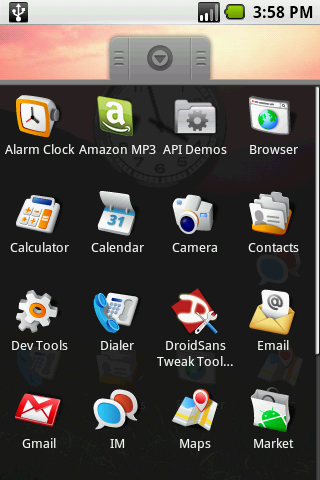
DroidSans Tweak Tools is a root-level utility that provides some cool abilities for your G1, for instance, Auto Rotation feature.
Key Features
– Remount /system directory to read/write or read only
– Reboot your phone
– Enable and disable auto rotation
– Check your current auto rotation feature status
Supported Firmware version
– Modded RC29
– Modded RC30
– Modded RC8 (UK)
Limitation
– Some applications may not support Auto Rotate Screen, for example, Browser.
How to install
1. First of all, please ensure that you have already updated your G1 using the modified firmware from xda-developers.com or you will not be able to run it.
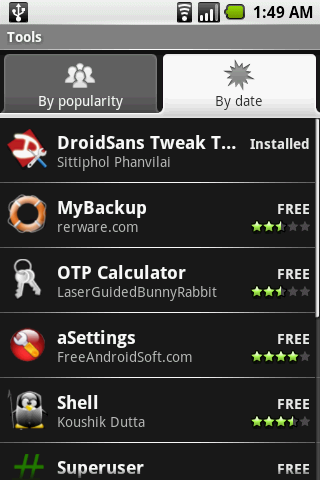
2. Install DroidSans Tweak Tools from Android Market.
3. Enjoy!
How to use
1. Remove su password (if any)
2. Open the utility, and you will see the following menu
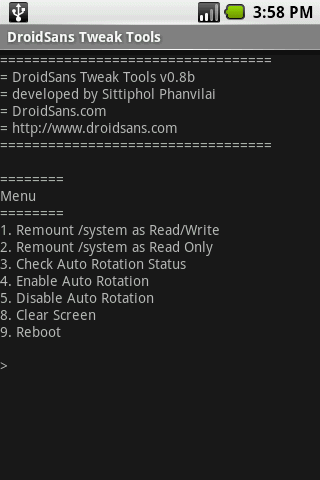
3. Select a choice of the action that you want. Please not that if you wanna enable or disable the auto rotation feature, you have to reboot your phone after making change.
Auto Rotate Video Demo
Future Works
Current version of DroidSans Tweak Tools is still in beta. Of course, we have plans to add more and more exciting features and also more user friendly UI. Next version will be released soon. Please keep your eyes on DroidSans.com 😉
Donation
DroidSans Tweak Tools is totally free. However, If you like it, please support us. So, we will have enough money to buy another phone models for our developers and help you rock the world! Thank you. 🙂
Great power toys !
Here's my wish list:
– Clear GTalk chat log.
– Disable Camera sound.
– Change the background of the clock widget (I really want the android clock showing on my desktop – but not sure if it's configurable).
– Configure the browser proxy
– Change locale value.
more to come 😉
Million Thanks for your suggestion. ^_^
้เยี่ยมเลยครับ ขอถามนิดนึงคือผมต้องลง Modified RC30 – full version ก่อนใช่ไหมครับ
พอดีผมเข้าไปดูแล้วแต่ไม่เข้าใจว่าผมต้อง Modded recovery and boot images ก่อน update RC30 หรือเปล่า พอดีอ่านแล้วไม่ค่อยเข้าใจ รบกวนคุณเนยด้วยนะครับ
There is a new DroidSans fellow following my twitter, asked about removing su password issue. you have any recommendation to him?
http://twitter.com/haitiankid4lyf/status/1025286675
คิดว่าต้องลง mod recovery ก่อนครับถึงจะลง mod RC30 ได้
กำลังจะเขียนให้แล้วครับ น่าจะวันนี้แหละเสร็จครับ
เห็นออกข่าวในเน็ทด้วย 🙂 click
ขอบคุณครับ ^^
i have no idea how to download or find update.zip HELP!!!
Here it is, Sir.
http://forum.xda-developers.com/showthread.php?t=443713
when i press number 4, it says "operation Failed" anyone knows about it?
You need modded RC30 to make it works. Look like you don't have it yet.
i have RC30 from updated. do i have to do Mod?
thank you
That's not enough. You need modded one to make it work.
However, if you already have original rc30, you can't install modded one anymore. Look like you have to wait for new release of application or firmware. 🙁
Actually I have no idead how to make it works on modded rc30 v1.2 since I'm still using v1.1
The only clue I got from xda-developer member is you have to remove su password and it will works.
Ummm… anybody here has experience on this? Please post the solution >_<
oh ok.. i can wait. thank you
ok. so i think i gotta upgrade to the rc30 modded but that shitt is soo confusing. can any1 help?
The unlocked Dev1 phone already has su with no password; so remounting and reboot work fine out of the box.
But it says "bad version" when I try to check or change the auto rotation.
Do Dev1 phones need the patches that G1 phones need to enable rotation?
Or something else?
Look like files in G1 and Dev Phone are different. Could you please send me /system/framework/framework.odex file to neon (ad) droidsans.com? I will check it.
ok i downloaded a modified firmware and everything else in save it to my download but does't sem to be there i ve done this over n over so frustrading can't get that sh*t to work…PLEASE HELP
IS TWEAK TOOLS ( AUTO ROTATE) NOT WORKING ON RC8 VERSION?
ALL UK'S G1 IS IN RC8 VERSION
IS THAT MEAN ITS NOT WORKING?
HELP
This tool support Mod RC08.
Ok, my stupid is contantly horizontal, no matter if the keyboard is closed or not. I downloaded this software hoping it would repair this problem and override a sensor or something that is screwed up. I get the following:
Checking for versin…Good version
Current Status: Disable
Trying to enable auto rotation
Current Status: Disable
Please reboot your phone…
Every time I try and enable it reads "Operation Failed" please help with this. Thanks!
Ok, my stupid phone screen is constantly horizontal, no matter if the keyboard is closed or not. I downloaded this software hoping it would repair this problem and override a sensor or something that is screwed up. I get the following:
Checking for versin…Good version
Current Status: Disable
Trying to enable auto rotation
Current Status: Disable
Please reboot your phone…
Every time I try and enable it reads "Operation Failed" please help with this. Thanks!
Hi,
You have to flash modded firmware RC30 first. If you are using stock RC30, you have to downgrade your phone to RC29 using instruction here. And then flash your phone with modded firmware RC30.
A bit complicated, right? However, this's only way to make DroidSans Tweak Tools work on your stock RC30 phone.
Hope your problem has been fixed soon.
.
I don't have ADP1 phone with me right now so I don't know how to make it works with.
Could you upload /system/framework/framework.odex file somewhere and provide ma a link please? I need that file to make DroidSans Tweak Tools for ADP1.
Thanks
Cool, so I will drop my project since now then.
Have a Dev phone on the way (should be here any minute actually), did you ever get these issues worked out? I'm dieing to try this mod.
Thanks.
Been playing around on the g1 dev all day! let me know if you fix the "bad version" error, I was getting it as well.
I downloaded the modded rc30 and believe I followed the instructions. However after pressing alt s then alt l it seemed to begin install and stopped immediately. showed triangled ! . Any suggestions. Trying to use droidsans tweak.
Could you give me what error message G1 showed?
THERE IS NO WORDED ERROR SIMPLY AN EXCLAMATION POINT INSIDE OF A TRIANGLE.
THERE IS AN IMAGE OF THE PHONE BELOW IT
thanks for updating works great
been waiting for the dutch release of g1 and my phone comes in next week.
do i have the downgrade the firmware to use this app?
I'm not sure about firmware on Dutch version. But the thing that you have to do before use this tool is to hack you phone.
I recently updated from RC29 to RC33 and I re-downloaded this app and it doesn't work anymore. I can't enable rotate, the only thing I can do is disable and reboot. Does anyone know of a solution? I have root access of course…
I had to get a new g1 because I broke my other one. as I am reinstalling all my apps i cannot seem to find tweak tools on the market… when I search droidsans all that it finds is the tweak tools lite and the virtual keyboard. Did you pull this app from the market? Do you have it anywhere on here where I can just download it?
I have the ADP1 phone and i recently installed the official ADP1.1 firmware on it. This app doesn't seem to work on firmware 1.1, it just says bad version.
Do I have to do anything special to get it to work?
No replies yet! And I thought I had read good things about the author.
Has anyone been able to install this after putting the official 1.1 firmware on the ADP1?
I fixed it for ADP1.1 already. However, let me check about it once more since I don't have ADP 1.1 phone in my hand to test.
Thanks for the reply. I tried uninstalling and re-installing the TweakTools app but it still says "bad version". Is there anything I can do to debug and give you more information?
very much agree
I have the same problem.. If I open just a little bit, it goes to portrait mode. But it's not easy to use like that. I just want to use Cupcake (ADP1.5) with DroidSans Tweak Tools.
Did you resolve your problem ?
ผมใช้ Dev Phone เวลากด Check auto rotate มันบอกว่า bad version อะครับ
ทำไงได้บ้าง
hey somebody knows why the version of droidsans from the market cannot be downloaded… could somebody upload the *.apk to some where that other ppl can downloal it…pl
I have CRC1 I'm not sure that I can update my phone to read Thai for this version ?….. I installs and I've done every procedures that you've shown…but still my phone can't read Thai why is that any help ? >.< please reply as quickly as u can….thank you ^^
I am very much overwhelmed by your thoughts for this particular story. A more deeper and staged knowledge would be good for me
Lipozene
After read a couple of the articles on your website these few days, and I truly like your style of blogging. I tag it to my favorites internet site list and will be checking back soon. Please check out my web site also and let me know what you think.
Lipozene Reviews
Some brilliant applications you have shared there. I also have them in phone and they are simply brilliant.
Custom Content Management System
I like the cut of your job 🙂 or at least your thought process but sorry to say, I honestly think you would have fully sold me on the idea had you been able to back up your premis with a substantial bit more solid facts.
hydroxycut reviews
Been reading this site for awhile now, always has really good posts and topics please keep it up! loads of blogs are going under lately from lack of new posts etc Lipozene
Now and then I’ll stumble across a post like this and I’ll recall that there really are still interesting pages on the web. ^_^. Thanks. Slimquick Reviews
Outstanding blog post, I have marked your site so ideally I’ll see much more on this subject in the foreseeable future. Slimquick
I would like to say that this blog really convinced me to do it! Thanks, very good post.
grezed
Its a great pleasure reading your post.Its full of information I am looking for and I love to post a comment that "The content of your post is awesome" Great work.
grezed
This is a great inspiring article.I am pretty much pleased with your good work.You put really very helpful information…
http://blackzonestudio.com
Just stumbled across your blog and was instantly amazed with all the useful information that is on it. Great post, just what i was looking for and i am looking forward to reading your other posts soon!
Lipozene side effects
This web site is really a walk-through for all of the info you wanted about this and didn’t know who to ask. Glimpse here, and you’ll definitely discover it.
garcinia cambogia extract
Well somehow I got to read lots of articles on your blog. It’s amazing how interesting it is for me to visit you very often. Sensa Side Effects
I believe that it doesn't matter how you look as long as you feel good in your own skin. For me a healthy life means going at least once a week to the gym, to take care of your body. The aerobic exercises or some powerful jumping exercises will help you to feel better in your skin.
Harrington Brooks was deregulated for VAT over 10 years ago and received an enormous back payment of 17.5 percent of all their clients payments, which to this day, has never been given back to the clients of Harrington Brooks & all associated companies under the control of Nick Holmes & Miles Grady (All Clear Finance and the directors of Paymatters). Worse still they kept charging the equivalent fee for nothing. No clients ever found out that Harrington Brooks did not have to pay VAT. I believe this has kept going on to this day. more details here
I really appreciate the kind of topics you post here. Thanks for sharing us a great information that is actually helpful. Good day!!! -buy real youtube views
พร้อมกับไมโครโฟนและลำโพงวงจรเพิ่มเติมเป็นนิติบุคคลที่จัดตั้งขึ้นเพื่อป้องกันไม่ให้สัญญาณเสียงที่เข้ามาและสัญญาณไมโครโฟนออกจากการรบกวนซึ่งกันและกัน.
audio typing services